

Payment Button
SpectroCoin payment buttons allow donations with just a few clicks. You can generate your own crypto payment button in just a few easy steps – no widgets or plugins needed. All you need to do is copy-paste our pre-prepared HTML code into your website and you are ready to accept crypto payments.
How payment buttons are useful
Payment buttons are ideal for collecting flexible payments, such as donations, where users can decide the amount they want to contribute. They allow businesses and non-profits to accept cryptocurrency quickly and easily, without setting up the merchant project. Payment buttons are especially helpful for scenarios like fundraising, tipping, or pay-what-you-want models, offering a simple way to accept crypto payments without predefined amounts.
Steps to create a payment button
- On any device (tablet, smartphone, or computer), log in to your SpectroCoin account and navigate to the Business tab.
- Click Integration tools, Payment buttons, and lastly, click Create button.
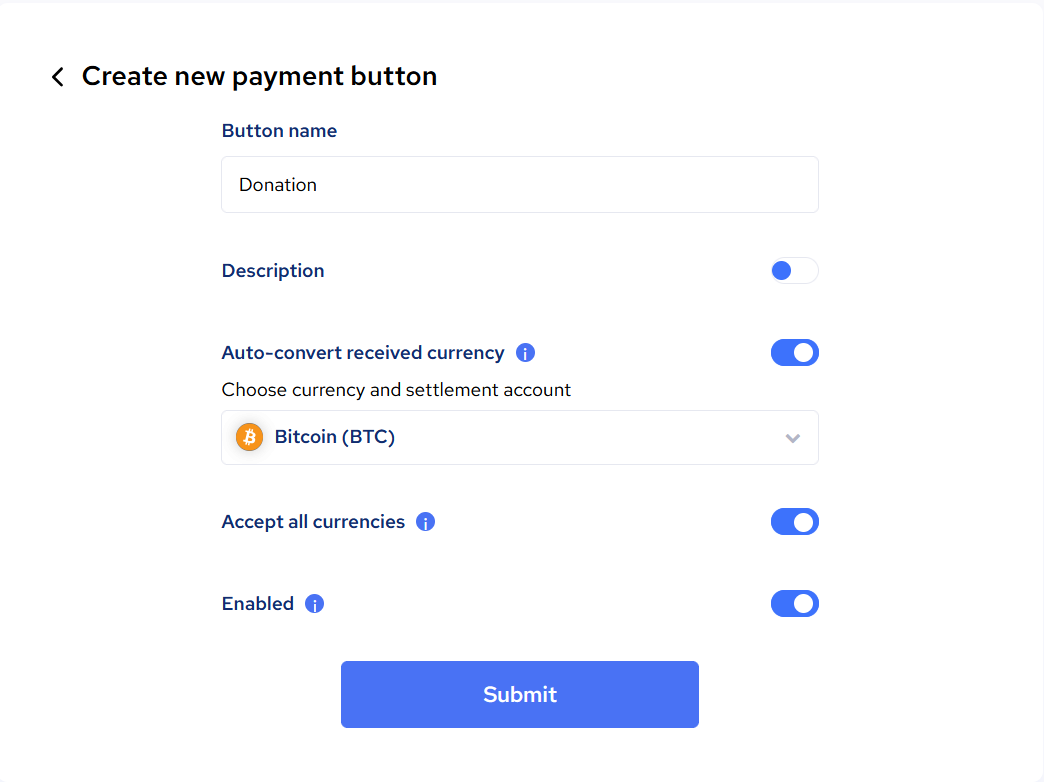
- Button creation settings will be visible as shown:
| Setting | Description |
|---|---|
| Button name | The name of the payment button. This is typically displayed to users, allowing them to understand the purpose of the payment (e.g., "Donation"). |
| Description | An optional field where you can add more details about the payment button, explaining its purpose or any specific notes. |
| Auto-convert received currency | When enabled, this feature automatically converts the received cryptocurrency into the selected settlement currency (e.g., Bitcoin). The user can choose the currency and associated settlement account. |
| Accept all currencies | When enabled, this allows the button to accept multiple cryptocurrencies. If disabled, the user can manually select which specific currencies to accept. |
| Enabled | This toggle enables or disables the payment button. When disabled, the button is inactive and cannot be used for payments. |
Settings can be later changed by clicking Edit button.
How to Use a Payment Button
A payment button can be used in two ways:
- By copying the Public URL, which can be shared via email, chat, or social media.
- By choosing a preferred payment button style and copying the HTML code. The buttons are fully customizable in terms of appearance.
Example payment button:
<a target="_blank" style="display:inline-block;padding:14px 24px;font-size:14px;border-radius:4px;font-weight:500;text-decoration:none;font-family:"Red Hat Text", sans-serif;text-align:center;background-color:#4972F4;color:white">
<link rel="preconnect" href="https://fonts.googleapis.com"/>
<link rel="preconnect" href="https://fonts.gstatic.com"/>
<link href="https://fonts.googleapis.com/css2?family=Red+Hat+Text:wght@500&display=swap" rel="stylesheet"/>
<span style="display:inline-block;line-height:26px">
Donate crypto with
<img style="vertical-align:bottom;height:24px;width:100px" src="https://spectrocoin.com/pb/spectrocoin_large_white.svg"/>
</span>
</a>Updated about 2 months ago